


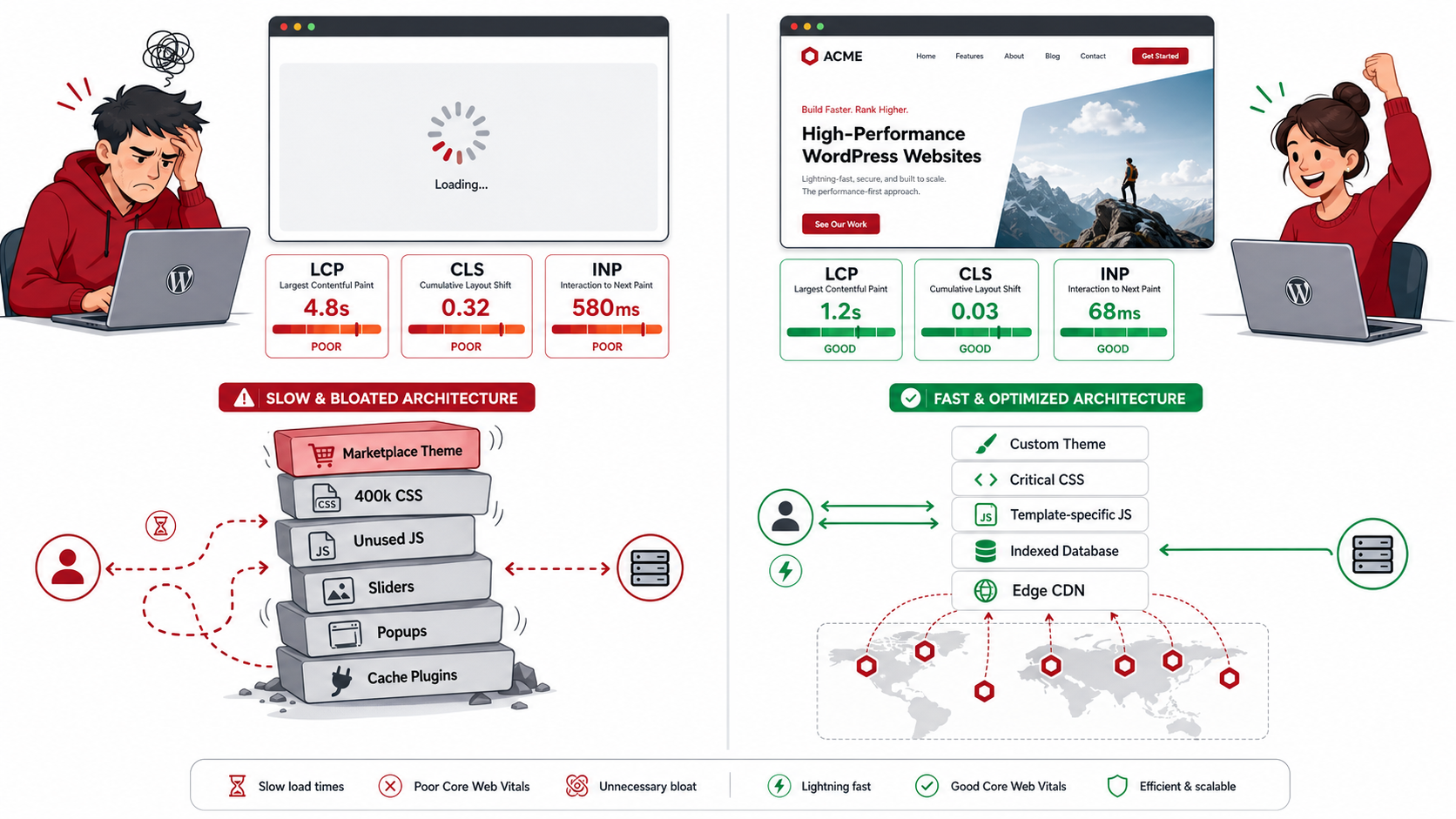
Go to almost any theme marketplace, and you will see well-designed demos for pitch after pitch of everything from portfolio galleries to e-commerce storefronts, all packaged in a singular theme. That bundle is the problem.
A standard multi-purpose marketplace theme comes with 150,000–400,000 lines of CSS out of the box to cover all possible layout combinations that it sells. For example, a homepage with a hero section, three feature cards, and sometimes a contact form would require fewer than 3000 of those lines. The other 97% loads anyway — dead weight your visitor’s browser has to parse, evaluate, and throw in the trash before displaying a single pixel on screen.
JavaScript compounds the problem. Sliders you never activated. A modal library for the popups you’re not using Use jQuery dependencies baked into page builders. Each one stored in the render-blocking pipeline, holding up the browser as your prospective buyer stares at a blank screen or half-painted layout.
Some of this can be hidden with plugin-based optimizers WP Rocket, W3 Total Cache or NitroPack but it’s not a complete solution. They minify, they concatenate files, they defer scripts. They think outside of the architecture, not within it. A plugin is helpless to know that a theme is enqueuing a 200-kb slider library for a page that has no slider. It has the ability to compress any damages after they have occured. You are basically covering with a band-aid a structural wound.
What you need is not a more clever plugin. It is a more minimalist base to start with.
The Essential Trio Explained: Why Custom Architecture Wins on LCP, CLS, and INP
So these Google’s Core Web Vitals are not just random benchmark values. Each one measures a different aspect of how actual users experience your website. Custom-coded themes counter all three at the core level; plugin stacks treat them — if they ever do — at the surface.
LCP: Largest Contentful Paint
LCP measures how long it takes for the largest visible element (often a hero image or headline) of the page to be rendered. The upper limit of what Google considers “Good” is 2.5 seconds.
In a marketplaces theme, the LCP element ends up being underneath many render-blocking stylesheet and script loads. The browser can not actually render something it has not yet been able to calculate the layout for. The browser receives this file before it has any idea where that hero image should be! Even with aggressive caching, the browser is still forced to parse and process hundreds of kilobytes of CSS.
An architecturally this nature of issue is met with a theme custom coded for it. Critical CSS path — stigma, or in this case, minimum styles that enable the rendering of above-the-fold content are inlined straight into . If identified as the LCP image, then it gets added attibute: fetchpriority=”high” and loading=”eager”, telling the browser to lower everything else in priority and load that asset first. No plugin can find your LCP element with the same level of accuracy as a developer that built the theme and has intimate knowledge of what will be the largest element on every template.
It yields: what the browser needs in order to render the viewport that’s visible at the moment on the first network request and nothing else.
CLS: Cumulative Layout Shift
CLS is a measure of visual stability — the amount of page content shifting around as the page loads. Anything greater than that in the 0.1 range fails Google’s threshold, but more importantly frustrates a user who clicks on the wrong thing because a button slid under their finger.
There is only one cause of layout shifts, loading an element whose dimensions are not known to the browser until after they have loaded. Images not having declared width and height attributes. Fonts that do fallback typeface swapping mid-render, causing text to reflow around the surrounding area. You are still right above the content that exists right now.
All of these are prevalent in marketplace themes. For example, page builders are high on creating an image container with no specific height and width. No size-adjust fallbacks for web fonts. They load asynchronously. Content is pushed down following the initial paint due to ad slots and dynamic widget areas.
Since in a custom coded theme every image has width and height defined explicitly at the HTML level, the browser knows what exact space to leave before the image actually arrives. Font loading is managed with font-display: optional, or meticulously crafted font-display: swap with fallback metrics that match the web fonts’ metrics, which means no reflow. Fixed-height containers in the CSS are given to ads and dynamic zones, which means injecting content backs up into a reserve instead of pushing existing content out.
Layout stability is designed in. This is a type of intentional reservation of space that, you guessed it, has no plugin equivalent.
INP: Interaction to Next Paint
INP (First Input to Next Paint): INP is the most difficult metric for plugin optimizers to improve, because (unlike FID) it is not just a measurement of the first input event during a session: rather, it measures the full input-to-paint cycle of every interaction from start to finish; INP replaced FID as a Core Web Vital in 2024. A click on a nav menu, an expansion of an accordion, submission of a form all are measured and your score is based upon the worst one. The Google threshold for “Good” is 200 ms
The INP destructor of good is main-thread contention. Any JavaScript file that runs on the main thread is competing with user input handling. Heavy initialization scripts with event listeners registered over hundreds of DOM elements, layout calculations running on load, task queues being set to initialize third-party libraries — anyways if they will be used on a given page or not.
A custom coded theme removes scripts that dont serve on a template. WooCommerce scripts are not loaded in a blog post page. It does not load gallery scripts on a contact page. The template-specific enqueueing is the main thread only devoted to code that actually matters for what the user is doing.
In addition, heavy interactions get off the main thread wherever possible via Web Workers; long tasks have their blockages broken into small async chunks through scheduler. yield() or setTimeout patterns, which means input handling is never blocked for longer than a millisecond or few. A plugin might delay loading scripts; it can’t fundamentally change how those scripts run after they’re loaded.
The Server Side: Infrastructure That Plugins Can Never Replace
That core web vitals starts before the browser even gets one byte. TTFB or Time to First Byte — the time that elapses between a user request and server response # 1 — is at the root of every other downstream metric. Your server takes 1.2 seconds to respond, and you have just burned through almost half your LCP budget before the browser has parsed a single line of HTML.
Oct 2023 Smart Server Routing and Clean Database Indexing
A WordPress site with WooCommerce, a page builder plugin, a membership plugin, and half-dozen integrations can rack up dozens or hundreds of database queries for just one page to load. Each query adds latency. Caching using plugins prevents repeated queries from incurring the cost of querying a data source again by serving cached results, but does not still address the underlying inefficiency with the query itself that makes a cache miss so expensive.
Custom systems (or very heavy WP refactors) treat the database differently. The data that is accessed most frequently can be arranged with meaningful composite indexes corresponding to workloads. Given this, any custom post type queries are written using as many meta-query joins avoided by tuning the WP_Query arguments. Instead of a plugin-authored system with blanket cache invalidation logic; this one is explicitly designed in the application layer for object caching via something like Redis or Memcached.
And when a cache miss does happen, an indexed database recovers from it in single digit milliseconds. An unindexed one gets back in seconds. Plugins store a cached version of that slow query; they do not fix the query.
Enterprise-Grade Edge Caching
What a caching plugin does, is it retains your rendered HTML using the same server that run PHP execution. When you have a traffic spike, your cache reads and uncached requests will compete for the same server resources. Plugin-level caching is fundamentally single-origin.
Enterprise edge caching: Provided by a well-configured CDN with full-page caching at the edge node (your large application as-it-is but on JavaScript, CSS and HTML delivery servers geographically close to your user(s )without any role being played by your origin server in response). This means for a user in London hitting one of the pages from an edge node within London, the server response time will be in single digit milliseconds, regardless where your origin server resides.
Properly achieving this requires clean URL architecture, appropriate application-level cache-control headers, written cache-purge rules that invalidate only what changed (rather than flush everything on each publish), and management of Vary headers to ensure logged-in users do not receive cached admin content. These are configuration decisions at the code and infrastructure level Some of them can be approximated with a plugin. Controlled Implementation means they must be built the right way from the beginning.
The Hidden Cost of the Plugin Strategy
Installing every extra plugin to make up for a bloated theme brings its own overhead – more database queries on load, more PHP to execute, and additional chances of conflict with the next plugin you install. Performance optimization plugins come with performance costs of their own. There’s a tipping point — and many sites reach it quickly — where the cost of optimization is almost equal to that of not optimizing.
At a deeper level, optimization via plugins treats the symptoms. A plugin can compress 400 kilobytes of CSS loaded by your theme to 200 kilobytes. No amount of optimization that it does can change the fact your page needed 3kb of it. Now, only the surface expression of that architectural problem is smoothed over.
Custom code architectures start with a very different premise: send only what the page requires, in the format baked into the browser that is fastest to consume it, and served from infrastructure optimized for speed rather than convenience. The outcome is not a PageSpeed score that needs twenty plugins to get somewhere and shatters every time you update one of them. Slough — and that score represents how the site is actually constructed.